> ## Documentation Index
> Fetch the complete documentation index at: https://docs.fluz.app/llms.txt
> Use this file to discover all available pages before exploring further.
# Overview
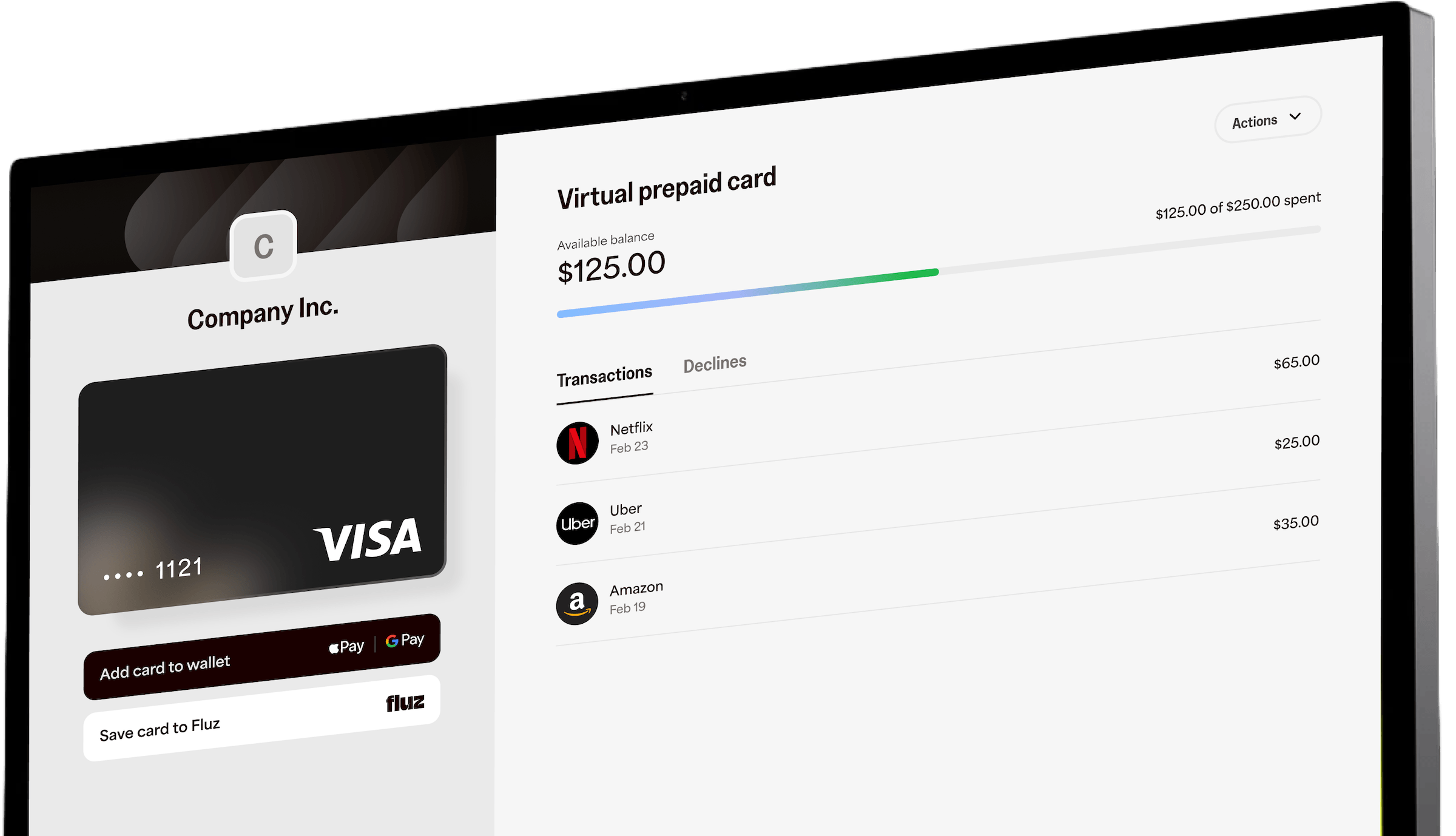
Generate **hosted virtual card links** ("open-loop" Send Cards) from your platform. You call one API to mint one or more links, then deliver those links to recipients however you like — by email, by SMS, or by handing back the raw URLs to embed in your own flows. When a recipient opens the link, they land on a Fluz-hosted page, verify themselves, and claim a single-load virtual card funded from your account.
**Prerequisites:** a Bearer access token carrying the `CREATE_SHARE_LINK` scope, and an account enabled for Send Cards (the `send_virtual_cards_enabled` campaign flag). Basic auth is rejected. Contact your sales rep to enable access. See [Authentication](/concepts/authentication).
**What "hosted" / "open-loop" means.** A *hosted* link points to a Fluz-hosted activation page. *Open-loop* means the resulting virtual card is a network card (Visa/Mastercard-style) that can be spent at many merchants, subject to your program's rules — not a single-brand closed-loop gift card.
## How it works
Call `generateVCShareLinks` with the offer, card limit, quantity, funding source, and a delivery method. Each link represents one card with its own limit, funded from the spend account you specify.
Each link maps to one share request (`PENDING`) and one hosted URL.
With `GENERATE_URL` you get the URLs back to distribute yourself. With `EMAIL` or `PHONE_NUMBER`, Fluz delivers a link to each recipient for you.
The recipient opens the link, verifies their phone number with a one-time code, and sets a card PIN — no app download, no password. The card limit is drawn against your spend account at claim time, not when the link is generated. They can then view card details, spend online, and add the card to Apple Pay or Google Pay in one tap.
The recipient becomes an authorized user of that virtual card object only — they do not gain access to your account, balances, or any other cards.
See the recipient experience in action: [desktop flow](https://test.fluz.app/wp-content/uploads/2026/04/Web-Share-V6.mp4) · [mobile flow](https://test.fluz.app/wp-content/uploads/2026/04/Mob-Share-F.mp4).

## Availability & scope
| Capability | Status |
| ----------------------------- | ----------------------------------- |
| Single-load virtual cards | ✅ Supported |
| Single-use / reloadable cards | ❌ Not supported |
| Generate links via API | ✅ Supported |
| Generate links via CSV Import | ✅ Supported |
| Hosted **gift-card** links | ❌ Not in scope (virtual cards only) |
The card share-link object type is `VIRTUAL_CARD` and the card type is `SINGLE_LOAD`.
**Gift cards:** Despite the "virtual cards **and** gift cards" framing of the broader initiative, there is no hosted gift-card claim flow today. Gift-card balances appear in this area only as a *potential funding source* for hosted virtual cards (planned, not yet enabled). Document and build against virtual cards only.
## Operation reference
There are three public operations, all gated by the `CREATE_SHARE_LINK` scope:
| Operation | Type | Purpose |
| ------------------------ | -------- | -------------------------------------------- |
| `generateVCShareLinks` | Mutation | Create one or more hosted virtual card links |
| `getVCShareLinks` | Query | List/inspect previously generated links |
| `deactivateVCShareLinks` | Mutation | Deactivate (expire) links you generated |
All Send Cards operations are on the Fluz GraphQL API at `POST https:///api/v1/graphql` with an `Authorization: Bearer ` header. The token must carry the `CREATE_SHARE_LINK` scope, and your account must have Send Cards enabled — without it, every operation returns *"Missing permissions! Please contact your sales rep to get access to generate VC share links."*
## generateVCShareLinks
Creates `quantity` share requests and returns one hosted link per request.
```graphql theme={null}
mutation GenerateVCShareLinks($input: GenerateVCShareLinksInput!) {
generateVCShareLinks(input: $input) {
shareLinks
}
}
```
### Input fields
| Field | Type | Required | Description |
| --------------------- | ------------------ | ----------- | ------------------------------------------------------------------------------------------------------------------------------------------------------------------------------------------------------ |
| `cardLimit` | `Int!` | Yes | Spend limit (and load amount) for each card, in whole currency units. Must be a whole number ≥ the program minimum. |
| `offerId` | `String!` | Yes | UUID v4 of the merchant offer the card is tied to. The offer must be active and its merchant must be shareable. |
| `quantity` | `Int!` | Yes | Number of links to generate. One distinct hosted URL is created per unit. |
| `shareMethod` | `ShareMethodType!` | Yes | How links are delivered: `GENERATE_URL`, `EMAIL`, or `PHONE_NUMBER`. |
| `userCashBalanceId` | `UUID` | Yes\* | The spend account used to fund the cards. *Marked optional in the schema but required in practice — omitting it fails validation.* |
| `daysUntilExpiration` | `Int` | No | Days until the link expires. Minimum 1. Defaults to the program default (30 days) if omitted. **This date also becomes the card's lock/freeze date** — see [Expiration & freeze](#expiration--freeze). |
| `recipientListEmail` | `[String]` | Conditional | Required and non-empty when `shareMethod = EMAIL`. Length must equal `quantity`. Must be empty otherwise. |
| `recipientListPhone` | `[String]` | Conditional | Required and non-empty when `shareMethod = PHONE_NUMBER`. Length must equal `quantity`. Must be empty otherwise. |
**Funding source.** Today, the only supported funding source is a **spend account** (`userCashBalanceId`), and it must belong to your (the sender's) account. Additional funding sources (bank account, bank card, prepayment/rewards balance) are not yet available.
### Delivery methods (`shareMethod`)
| Value | Behavior | Recipient list |
| -------------- | --------------------------------------------------------------------------- | ------------------------------------------------------------ |
| `GENERATE_URL` | Fluz returns the hosted URLs in the response. You distribute them yourself. | Both lists must be empty/omitted. |
| `EMAIL` | Fluz emails a link to each recipient. | `recipientListEmail` required; length must equal `quantity`. |
| `PHONE_NUMBER` | Fluz texts a link to each recipient. | `recipientListPhone` required; length must equal `quantity`. |
### Validation rules
* `cardLimit` must be a whole number and at least the program minimum.
* `offerId` must be a valid UUID v4 for an **active** offer whose **merchant is shareable**.
* `quantity` must be a whole number.
* When delivering by `EMAIL` or `PHONE_NUMBER`, the matching recipient list length **must equal** `quantity`. Mismatches return a clear error and create **no** records.
* Only one funding source may be supplied. `userCashBalanceId` must be a valid UUID v4 owned by the sender's account.
* Invalid card types or malformed inputs return clear errors and create no records.
### Examples
```json Generate URLs theme={null}
{
"input": {
"cardLimit": 25,
"offerId": "11111111-2222-3333-4444-555555555555",
"daysUntilExpiration": 30,
"quantity": 3,
"shareMethod": "GENERATE_URL",
"userCashBalanceId": "aaaaaaaa-bbbb-cccc-dddd-eeeeeeeeeeee"
}
}
```
```json Email theme={null}
{
"input": {
"cardLimit": 25,
"offerId": "11111111-2222-3333-4444-555555555555",
"daysUntilExpiration": 30,
"quantity": 2,
"shareMethod": "EMAIL",
"recipientListEmail": ["recipient1@example.com", "recipient2@example.com"],
"userCashBalanceId": "aaaaaaaa-bbbb-cccc-dddd-eeeeeeeeeeee"
}
}
```
```json SMS theme={null}
{
"input": {
"cardLimit": 25,
"offerId": "11111111-2222-3333-4444-555555555555",
"daysUntilExpiration": 30,
"quantity": 2,
"shareMethod": "PHONE_NUMBER",
"recipientListPhone": ["+12125550101", "+12125550102"],
"userCashBalanceId": "aaaaaaaa-bbbb-cccc-dddd-eeeeeeeeeeee"
}
}
```
### Response
```json theme={null}
{
"data": {
"generateVCShareLinks": {
"shareLinks": [
"https://fluz.app/virtual-prepaid-card/3f8a...c1",
"https://fluz.app/virtual-prepaid-card/9b2d...77",
"https://fluz.app/virtual-prepaid-card/0c41...e3"
]
}
}
}
```
`shareLinks` is an array of hosted URLs, one per `quantity`, each of the form `https://fluz.app/virtual-prepaid-card/{share_request_id}`.
The response returns only the URLs. To retrieve the **batch ID** and **display IDs** for the links you just created (needed for listing and deactivation), use `getVCShareLinks` filtered by status.
## getVCShareLinks
Lists previously generated share links so you can inspect status, recipients, expiration, and the issued card.
```graphql theme={null}
query GetVCShareLinks($input: GetVCShareLinksInput!) {
getVCShareLinks(input: $input) {
senderAppId
shareRequestBatchId
shareRequestDisplayId
shareObjectStatus
recipientPhone
recipientEmail
linkExpirationDate
virtualCardId
linkUrl
shareRequestDetails {
cardLimit
offerId
daysUntilExpiration
quantity
shareMethod
recipientListEmail
recipientListPhone
userCashBalanceId
}
}
}
```
### Input fields
| Field | Type | Description |
| ------------------------ | --------------------- | --------------------------------------------------------- |
| `shareObjectStatuses` | `[ShareObjectStatus]` | Filter by status: `PENDING`, `ISSUED`, `USED`, `EXPIRED`. |
| `shareRequestBatchIds` | `[String]` | Return only links in these batches. |
| `shareRequestDisplayIds` | `[String]` | Return only the links with these display IDs. |
**Recommended flow.** On the first call, filter by `shareObjectStatuses` only. The response gives you `shareRequestBatchId` and `shareRequestDisplayId` values; use those to filter precisely on subsequent calls (and to deactivate).
### Response fields (`GeneratedShareLink`)
| Field | Type | Description |
| ----------------------- | --------------------- | ---------------------------------------------------------------------------- |
| `senderAppId` | `String` | The app/developer application that generated the link. |
| `shareRequestBatchId` | `String` | Batch identifier shared by all links generated in one call. |
| `shareRequestDisplayId` | `String` | Human-friendly per-link identifier. |
| `shareObjectStatus` | `ShareObjectStatus` | `PENDING`, `ISSUED`, `USED`, or `EXPIRED`. |
| `recipientEmail` | `String` | Recipient email, if delivered by email. |
| `recipientPhone` | `String` | Recipient phone, if delivered by SMS. |
| `linkExpirationDate` | `DateTime` | When the link expires / card freezes. |
| `virtualCardId` | `String` | The issued virtual card ID, once claimed. |
| `linkUrl` | `String` | The hosted URL for the link. |
| `shareRequestDetails` | `ShareRequestDetails` | The original configuration (card limit, offer, quantity, delivery, funding). |
### Examples
```json By status theme={null}
{ "input": { "shareObjectStatuses": ["PENDING", "ISSUED"] } }
```
```json By batch theme={null}
{ "input": { "shareRequestBatchIds": ["ABC123", "XYZ789"] } }
```
```json By display ID theme={null}
{ "input": { "shareRequestDisplayIds": ["SR-000001", "SR-000002"] } }
```
## deactivateVCShareLinks
Deactivates (expires) links you generated — for example, if a batch was sent in error or you need to revoke unclaimed links. Deactivating a link sets it to `EXPIRED`; an unclaimed link can no longer be claimed.
```graphql theme={null}
mutation DeactivateVCShareLinks($input: DeactivateVCShareLinksInput!) {
deactivateVCShareLinks(input: $input)
}
```
### Input fields
| Field | Type | Description |
| ------------------------ | ---------- | ------------------------------------------------- |
| `shareRequestBatchIds` | `[String]` | Deactivate every link in these batches. |
| `shareRequestDisplayIds` | `[String]` | Deactivate only the links with these display IDs. |
Get the batch IDs from `getVCShareLinks`.
```json theme={null}
{ "input": { "shareRequestBatchIds": ["ABC123"] } }
```
Returns a human-readable confirmation string, e.g. `"3 share requests successfully deactivated!"`.
If a recipient has already **claimed** a link (status `ISSUED`/`USED`), deactivating the link does not claw back the issued card. To stop spend on an already-issued card, use the relevant card lifecycle/freeze controls.
## The recipient experience
When a recipient opens a hosted link (`https://fluz.app/virtual-prepaid-card/{share_request_id}`):
The recipient sees the activation page branded with the sender's business. They sign in through the Fluz auth portal (new recipients onboard here).
On initial load, existing users are taken to the 2FA screen. 2FA is required before the card can be viewed or claimed.
If the recipient has no billing address on file, they're prompted to add one. *Billing address is required for online purchases.*
Before the card is issued, the recipient sets a PIN.
A single-load virtual card is created and assigned to the recipient, funded from the sender's account, with a lock date equal to the link's expiration date.
Once claimed, the recipient can see card details, transactions, and (where supported) add the card to a mobile wallet.
**Already claimed?** If the same user opens a link they already claimed, they see their card details. If a *different* user opens a link that someone else already claimed, they're shown an access-denied state after 2FA.
## Expiration & freeze
The link's expiration date does double duty:
* **Link expiration** — after this date, an **unclaimed** link can no longer be claimed.
* **Card freeze / lock date** — for an **issued** card, this is the lock date (end of that day). After it, the card is frozen and cannot be spent.
* **Card expiry** is aligned to the end of the month of the freeze date (e.g., a freeze date of 6/15/2026 yields a card expiry of 6/30/2026).
Set the window with `daysUntilExpiration` at generation time. If omitted, the program default (30 days) is used. This date is shown to the recipient (typically as a "Valid until" date).
## Program rules to communicate to recipients
These are program-level rules for hosted (open-loop) virtual cards. Confirm the exact values for **your** program with your Fluz representative — several are partner-negotiated.
| Rule | Default | Notes |
| --------------------------------- | ---------------------- | -------------------------------------------------------------------------------- |
| Daily account spend limit | **\$250,000/day** | Some partners have a custom limit. |
| Restaurant transaction buffer | **25%** | A 25% buffer applies to all programs (to accommodate tips/holds at restaurants). |
| Restricted merchants / categories | Program-specific | Certain merchant categories are restricted. |
| Funding | Sender's spend account | Cards are funded from the sender's account at claim time. |
**Customer support for recipients:** 1-888-360-6660 · [humans@fluz.app](mailto:humans@fluz.app)
The full partner-facing reference (terminology, recipient walkthrough with screenshots, funding instructions, restricted categories, and support) lives in the **Partner Guide — Hosted URL Virtual Cards**. Ask your Fluz contact for the latest copy for your program.
## Status & error reference
### Share object statuses
| Status | Meaning |
| --------- | ------------------------------------------------------ |
| `PENDING` | Link generated, not yet claimed. |
| `ISSUED` | Recipient claimed the link; a virtual card was issued. |
| `USED` | The issued card has been used. |
| `EXPIRED` | Link expired or was deactivated; no longer claimable. |
### Recipient-facing link errors
| Condition | What the recipient sees |
| ---------------------------------------------- | -------------------------------------------------------- |
| Link expired before being claimed | "Expired before issued" — link can no longer be claimed. |
| Sender deactivated the link early | "Frozen by sender" — link was revoked before expiry. |
| Card was claimed, then its lock date passed | "Expired after issued" — card is frozen. |
| A different user opens an already-claimed link | "Access denied". |
### Common API errors
| Cause | Result |
| -------------------------------------------------------------------- | -------------------------------------------------- |
| Missing/invalid Bearer token or missing `CREATE_SHARE_LINK` scope | Request rejected (unauthorized). |
| Account lacks Send Cards access (`send_virtual_cards_enabled`) | Permissions error directing you to your sales rep. |
| Recipient list length ≠ `quantity` | Clear validation error; no records created. |
| Inactive offer, non-shareable merchant, or invalid `offerId` | Validation error; no records created. |
| Missing/invalid `userCashBalanceId`, or more than one funding source | Validation error; no records created. |
## Notes & limitations
* **Returned URL is the hosted destination, not a short link.** Internally, links are also wrapped by a short-link provider, but the API returns the canonical hosted URL (`/virtual-prepaid-card/{share_request_id}`). Distribute the URL exactly as returned.
* `userCashBalanceId` is effectively required even though the schema marks it optional.
* **Hidden/internal fields are not part of this API.** Object type and card type are fixed (`VIRTUAL_CARD` / `SINGLE_LOAD`) and other funding-source fields are not yet enabled; do not send them.
* **Gift-card hosted links are not supported.** This API is for virtual cards only.
## Next steps
The focused reference for `generateVCShareLinks`, if that's all you need.
Issue many cards at once for programmatic distribution.