> ## Documentation Index
> Fetch the complete documentation index at: https://docs.fluz.app/llms.txt
> Use this file to discover all available pages before exploring further.
# Formatting Referral Links
Referral links allow you to invite individuals into your Fluz referral network and receive royalties for those referrals. You can also utilize your referral link if you have an affiliate feed where you direct your users to buy gift cards. You will then earn a commission from Fluz from those referrals who use your link.
## Format a referral URL
To format the referral URL you will need the `merchantSlug` and your referral code.
To view the `merchantSlug` field, you can use the [getMerchants](/get-catalog) query. If you know the name of the merchant, include that input argument to refine the response. Add the `merchantSlug` field into the URL structure below to form the merchant URL:
`https://fluz.app/store/{merchant-slug}`
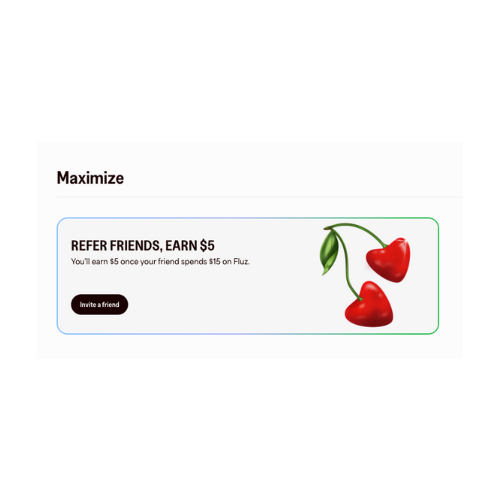
Next, you will need your referral code. You can find your referral code on the homepage in the Fluz web portal under **Maximize**. Click on **Invite a friend** to access your referral code.
 Then, under **Share your referral code** select **Copy** to save your code.
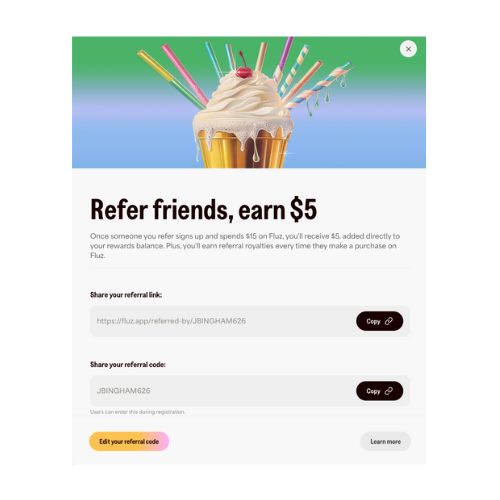 Once you have your referral code, you can add that information to the merchant URL from above to create your referral code URL:
`https://fluz.app/store/{merchant-slug}?referred_by={Referral_Code}`
## Using getReferralUrl
You can also run the `getReferralUrl` query to automatically display your referral URL link.
This query takes the `MerchantInput` as the optional input field. The order of precedence is `id` -> `slug` -> `name`.
```text theme={null}
{
"id": "f37cff96-6ca7-4197-b4ff-32ce94433455",
"slug": "xyz789",
"name": "xyz789"
}
```
Your referrals can then use this URL to pull the cashback rates from a specific merchant. If no `MerchantInput` is entered or the slug does not exists, it will return the default string:
`https://fluz.app/referred-by/{Referral_Code}`
Otherwise, the response will be:
`https://fluz.app/store/{merchant-slug}?referred_by={Referral_Code}`
The full catalog updates twice daily, and stock availability may change. Review [Inventory on Stocked Offers](/get-inventory) to learn how to retrieve stock information.
To learn more about the merchant catalog, visit [Catalog Overview](/merchant-catalog).
Once you have your referral code, you can add that information to the merchant URL from above to create your referral code URL:
`https://fluz.app/store/{merchant-slug}?referred_by={Referral_Code}`
## Using getReferralUrl
You can also run the `getReferralUrl` query to automatically display your referral URL link.
This query takes the `MerchantInput` as the optional input field. The order of precedence is `id` -> `slug` -> `name`.
```text theme={null}
{
"id": "f37cff96-6ca7-4197-b4ff-32ce94433455",
"slug": "xyz789",
"name": "xyz789"
}
```
Your referrals can then use this URL to pull the cashback rates from a specific merchant. If no `MerchantInput` is entered or the slug does not exists, it will return the default string:
`https://fluz.app/referred-by/{Referral_Code}`
Otherwise, the response will be:
`https://fluz.app/store/{merchant-slug}?referred_by={Referral_Code}`
The full catalog updates twice daily, and stock availability may change. Review [Inventory on Stocked Offers](/get-inventory) to learn how to retrieve stock information.
To learn more about the merchant catalog, visit [Catalog Overview](/merchant-catalog).