> ## Documentation Index
> Fetch the complete documentation index at: https://docs.fluz.app/llms.txt
> Use this file to discover all available pages before exploring further.
# API credentials and access tokens
> Exchange your API key for a short-lived, scoped user access token.
## Obtain your API credentials
Once your application is created in the Developer Console, select it to find its **API Key**, **User ID**, and **Account ID**.
**Where to find them:** the [Developers page](https://uni.staging.fluzapp.com/developers), inside the application you created. These credentials power API key authorization — primarily administrative calls and generating user access tokens.
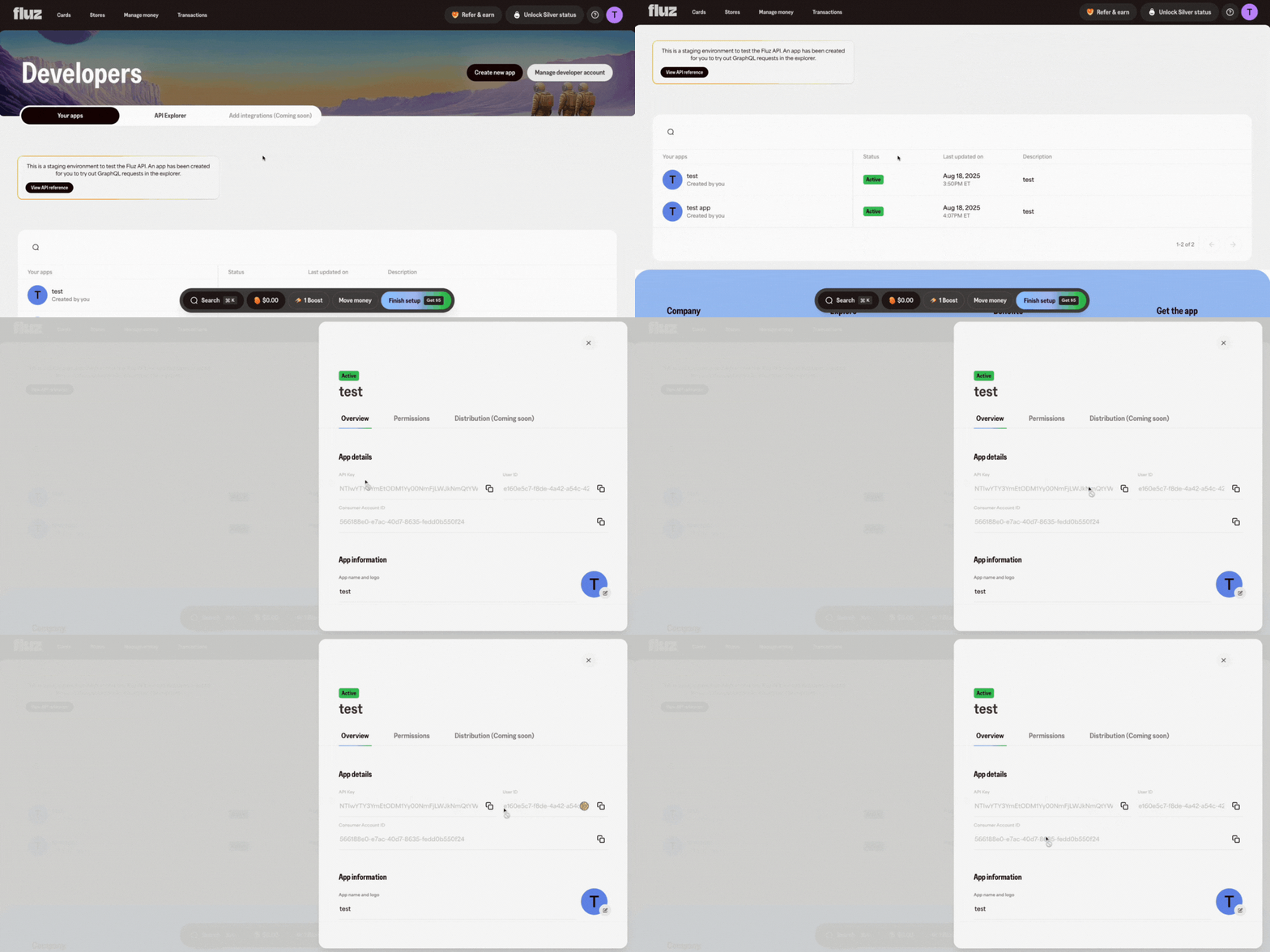
Every Fluz API request uses a **user access token** in the `Authorization` header. You mint the token from your application's `clientId` and `clientSecret` by calling the `generateUserAccessToken` mutation against the OAuth service.
## Generate an access token
```bash theme={null}
curl -X POST https://oauth-service.fluzapp.com/graphql \
-H "Content-Type: application/json" \
-d '{
"query": "mutation ($clientId: String!, $clientSecret: String!, $scopes: [Scope!]!) { generateUserAccessToken(clientId: $clientId, clientSecret: $clientSecret, scopes: $scopes) { accessToken expiresIn scopes } }",
"variables": {
"clientId": "",
"clientSecret": "",
"scopes": ["LIST_OFFERS", "PURCHASE_GIFTCARD", "REVEAL_GIFTCARD"]
}
}'
```
The response contains an access token, its lifetime, and the scopes it carries:
```json theme={null}
{
"data": {
"generateUserAccessToken": {
"accessToken": "eyJhbGciOi...",
"expiresIn": 3600,
"scopes": ["LIST_OFFERS", "PURCHASE_GIFTCARD", "REVEAL_GIFTCARD"]
}
}
}
```
## Use the token
Attach the token to every GraphQL request against the transactional graph:
```bash theme={null}
curl -X POST https://transactional-graph.staging.fluzapp.com/api/v1/graphql \
-H "Authorization: Bearer " \
-H "Content-Type: application/json" \
-d '{"query":"{ viewer { id email } }"}'
```
Never ship `clientSecret` values to a browser or mobile client. Mint access tokens server-side and forward only the token to the client if you must.
## Refresh before expiry
Access tokens are short-lived. Request a new one before the current one expires — don't wait for a `401`. See [Refresh an Expired Access Token](/get-started/refresh-expired-access-token) for the exact call, and [Authentication](/concepts/authentication) for the full flow, including OAuth grants for customer-scoped tokens.
## Next steps
Run the full happy path end to end — deposit funds, buy a gift card, and reveal it in the sandbox.
Swap a refresh token for a new access token without re-running the credential flow.