> ## Documentation Index
> Fetch the complete documentation index at: https://docs.fluz.app/llms.txt
> Use this file to discover all available pages before exploring further.
# Prepare Your Accounts
Before writing any code, you need the right accounts and keys.
This is the first step in getting up and running with the Fluz API. Before you can authenticate or make your first call, you need three things: a Fluz account, access to the **Developers** area, and a registered application that issues your API credentials.
Everything below takes just a few minutes.
**Start in the sandbox.** All setup happens in Fluz's sandbox (staging) environment first, at [uni.staging.fluzapp.com](https://uni.staging.fluzapp.com). Sandbox lets you build and test with sandbox keys, [test bank accounts](/test-bank-accounts), and [test card offers](/test-bank-cards) — no real money moves. When you're ready to go live, see [Staging vs. Live Environment](/concepts/environments).
* **New user?** Visit the [Fluz sandbox](https://uni.staging.fluzapp.com) and sign up.
* **Existing user?** Log in and open the **Developers** section — or go straight to [uni.staging.fluzapp.com/developers](https://uni.staging.fluzapp.com/developers).
The **Developers** section is where your applications and API credentials live.
Registering an application is what generates the API key and credentials you'll authenticate with. From the **Developers** section:
1. Click **Create new Application**.
2. Fill in **App name and logo**, **Subtitle**, and **What is the main purpose of this app?**
3. Click **Create new app**.
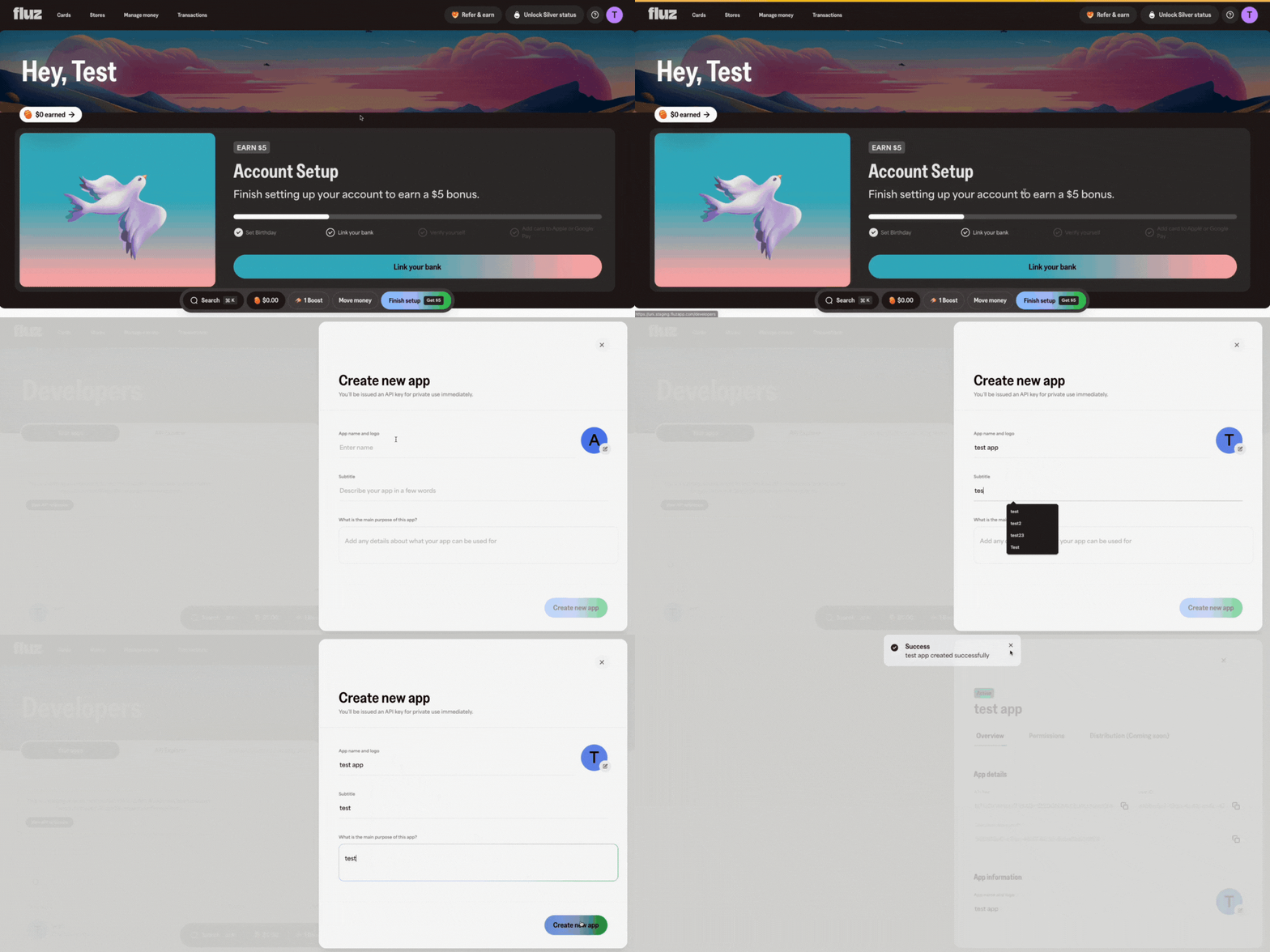
**When you're done, you'll have:** a Fluz sandbox account with access to the **Developers** area, a registered application, and everything you need to retrieve your API credentials.
## Next steps
With your account and application in place, you're ready to authenticate. The full flow is documented in the [Authentication & Authorization guide](/concepts/authentication).
Retrieve the API key tied to your application and exchange it for a scoped access token.
A runnable recipe that mints a token with the scopes your integration needs.
***
**Want to learn more?** Contact us at [support@fluz.app](mailto:support@fluz.app) to speak with our experts or request a demo.