> ## Documentation Index
> Fetch the complete documentation index at: https://docs.fluz.app/llms.txt
> Use this file to discover all available pages before exploring further.
# 格式化推薦連結
推薦連結可讓你邀請他人加入你的 Fluz 推薦網路,並從這些推薦中獲得權利金。如果你有導購的聯盟流量來源,當你引導使用者去購買禮品卡時,也能使用你的推薦連結。當使用者透過你的連結使用 Fluz,你將從這些推薦交易中賺取佣金。
## 格式化推薦 URL
要格式化推薦 URL,你需要 `merchantSlug` 與你的推薦代碼。
要查看 `merchantSlug` 欄位,你可以使用 [getMerchants](/get-catalog) 查詢。如果你知道商家的名稱,請在輸入中包含該參數以縮小回應範圍。將 `merchantSlug` 欄位加入下方的 URL 結構中以形成商家 URL:
`https://fluz.app/store/{merchant-slug}`
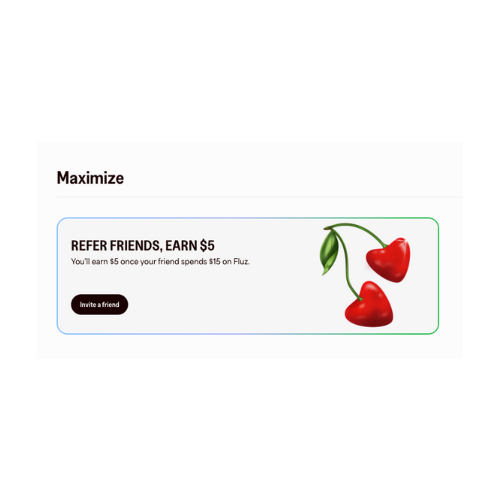
接著,你需要你的推薦代碼。你可以在 Fluz 網頁入口的首頁中 **Maximize** 區塊下找到你的推薦代碼。點擊 **Invite a friend** 以存取你的推薦代碼。
 然後在 **Share your referral code** 下方選擇 **Copy** 以複製你的代碼。
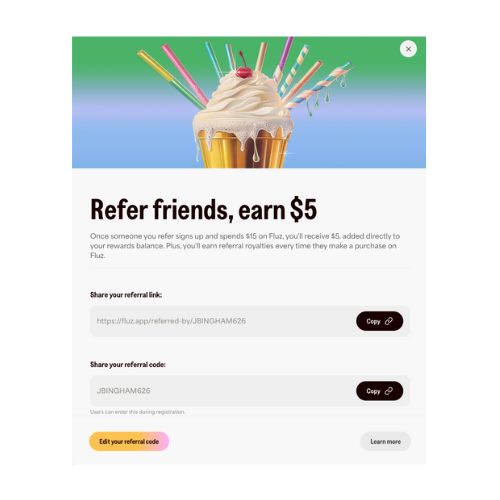 取得推薦代碼後,你可以將該資訊加到前述的商家 URL,建立你的推薦代碼 URL:
`https://fluz.app/store/{merchant-slug}?referred_by={Referral_Code}`
## 使用 getReferralUrl
你也可以執行 `getReferralUrl` 查詢,自動產生你的推薦 URL 連結。
此查詢將 `MerchantInput` 作為選用輸入欄位。優先順序為 `id` -> `slug` -> `name`。
```text theme={null}
{
"id": "f37cff96-6ca7-4197-b4ff-32ce94433455",
"slug": "xyz789",
"name": "xyz789"
}
```
你的被推薦人即可使用此 URL 擷取特定商家的現金回饋比率。若未提供 `MerchantInput` 或該 slug 不存在,將回傳預設字串:
`https://fluz.app/referred-by/{Referral_Code}`
否則,回應將為:
`https://fluz.app/store/{merchant-slug}?referred_by={Referral_Code}`
完整目錄每日更新兩次,庫存可用性可能會變動。請參考 [Inventory on Stocked Offers](/get-inventory) 以瞭解如何取得庫存資訊。
想進一步瞭解商家目錄,請前往 [Catalog Overview](/merchant-catalog)。
取得推薦代碼後,你可以將該資訊加到前述的商家 URL,建立你的推薦代碼 URL:
`https://fluz.app/store/{merchant-slug}?referred_by={Referral_Code}`
## 使用 getReferralUrl
你也可以執行 `getReferralUrl` 查詢,自動產生你的推薦 URL 連結。
此查詢將 `MerchantInput` 作為選用輸入欄位。優先順序為 `id` -> `slug` -> `name`。
```text theme={null}
{
"id": "f37cff96-6ca7-4197-b4ff-32ce94433455",
"slug": "xyz789",
"name": "xyz789"
}
```
你的被推薦人即可使用此 URL 擷取特定商家的現金回饋比率。若未提供 `MerchantInput` 或該 slug 不存在,將回傳預設字串:
`https://fluz.app/referred-by/{Referral_Code}`
否則,回應將為:
`https://fluz.app/store/{merchant-slug}?referred_by={Referral_Code}`
完整目錄每日更新兩次,庫存可用性可能會變動。請參考 [Inventory on Stocked Offers](/get-inventory) 以瞭解如何取得庫存資訊。
想進一步瞭解商家目錄,請前往 [Catalog Overview](/merchant-catalog)。