> ## Documentation Index
> Fetch the complete documentation index at: https://docs.fluz.app/llms.txt
> Use this file to discover all available pages before exploring further.
# API 憑證與存取權杖
> 以您的 API key 交換短效、具範圍的使用者存取權杖。
## 取得您的 API 憑證
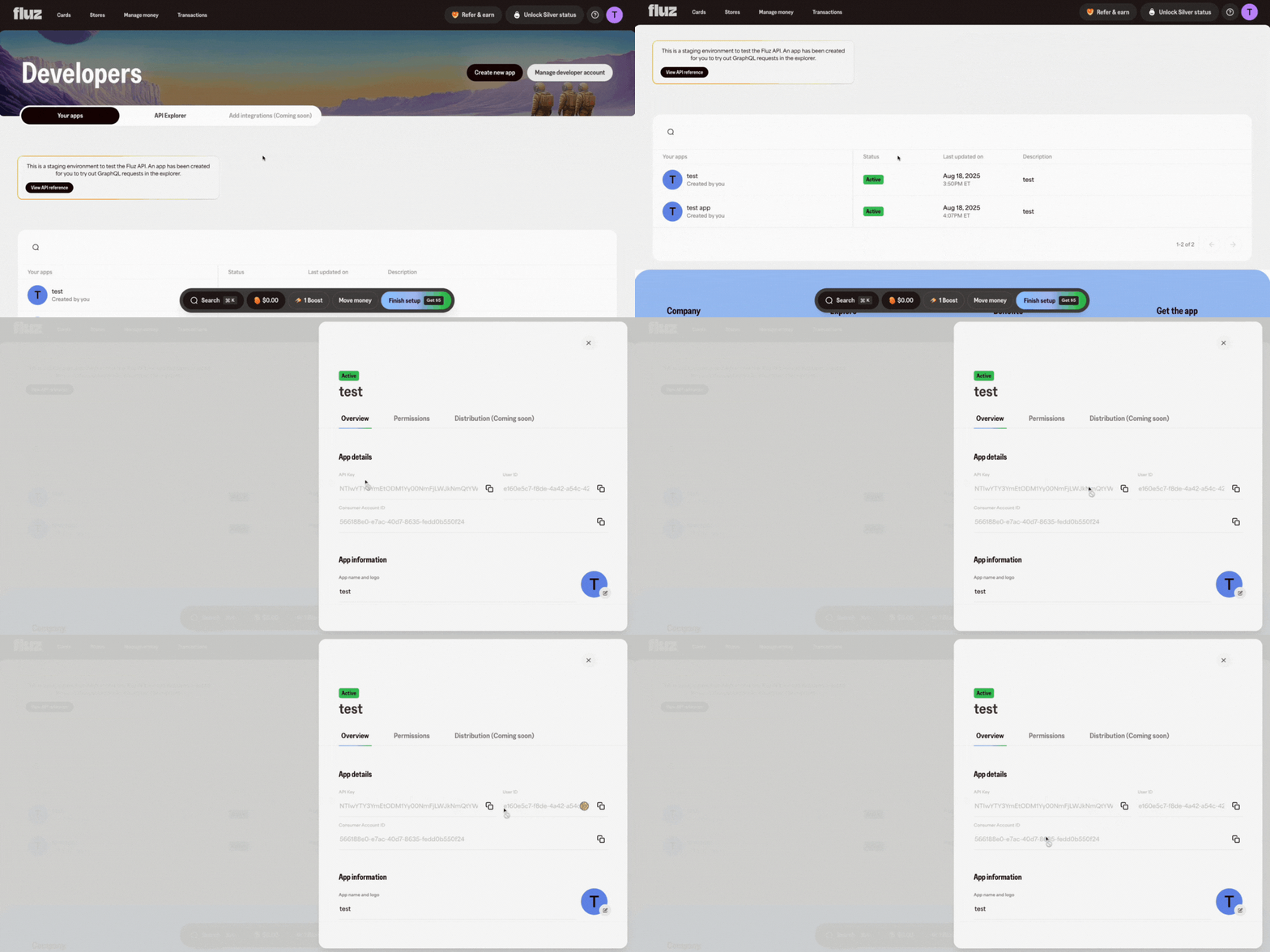
在開發者主控台建立應用程式後,選取它以找到其 **API Key**、**User ID** 和 **Account ID**。
**在哪裡找到:** [開發者頁面](https://uni.staging.fluzapp.com/developers),在您建立的應用程式內。這些憑證用於 API key 授權——主要用於管理性呼叫與產生使用者存取權杖。
每個 Fluz API 請求都會在 `Authorization` 標頭使用**使用者存取權杖**。您可透過呼叫 OAuth 服務的 `generateUserAccessToken` 變更,使用應用程式的 `clientId` 與 `clientSecret` 來鑄造該權杖。
## 產生存取權杖
```bash theme={null}
curl -X POST https://oauth-service.fluzapp.com/graphql \
-H "Content-Type: application/json" \
-d '{
"query": "mutation ($clientId: String!, $clientSecret: String!, $scopes: [Scope!]!) { generateUserAccessToken(clientId: $clientId, clientSecret: $clientSecret, scopes: $scopes) { accessToken expiresIn scopes } }",
"variables": {
"clientId": "",
"clientSecret": "",
"scopes": ["LIST_OFFERS", "PURCHASE_GIFTCARD", "REVEAL_GIFTCARD"]
}
}'
```
回應包含存取權杖、其存續時間,以及其所具備的範圍:
```json theme={null}
{
"data": {
"generateUserAccessToken": {
"accessToken": "eyJhbGciOi...",
"expiresIn": 3600,
"scopes": ["LIST_OFFERS", "PURCHASE_GIFTCARD", "REVEAL_GIFTCARD"]
}
}
}
```
## 使用權杖
將權杖附加到對交易圖譜的每個 GraphQL 請求:
```bash theme={null}
curl -X POST https://transactional-graph.staging.fluzapp.com/api/v1/graphql \
-H "Authorization: Bearer " \
-H "Content-Type: application/json" \
-d '{"query":"{ viewer { id email } }"}'
```
切勿將 `clientSecret` 值放到瀏覽器或行動端。請在伺服器端鑄造存取權杖,若有必要,僅將權杖轉交給用戶端。
## 到期前重新整理
存取權杖為短效。請在目前權杖到期前重新請求新的——不要等到收到 `401`。請參閱[重新整理過期的存取權杖](/get-started/refresh-expired-access-token)以取得確切呼叫方式,以及[驗證](/concepts/authentication)以了解完整流程,包括用於客戶範圍權杖的 OAuth 授權方式。
## 後續步驟
端到端完成完整的 happy path——存入資金、購買禮品卡,並在沙盒中揭露它。
以更新權杖交換新的存取權杖,而不需重新執行憑證流程。