
Webhooks
Webhooks for OAuth Applications
Webhooks allow your application to receive real-time notifications when events occur in user accounts. When enabled, Fluz will send HTTP POST requests to your configured endpoint URL with event details.
Available Events
Webhooks are sent based on the scopes granted by the user during OAuth authorization. Events are only delivered if the user has granted the required scope.
| Event Type | Required Scope | Description |
|---|---|---|
WIDGET_KYC_INITIATION | VERIFY_KYC | Triggered when a user initiates KYC verification from the widget |
WIDGET_DEPOSIT_COMPLETE | MAKE_PAYOUT_SEND | Triggered when a user successfully sends (deposits) into the application |
WIDGET_WITHDRAW_COMPLETE | MAKE_PAYOUT_RECEIVE | Triggered when a user successfully receives (withdraws) from the application |
TRANSACTION_CREATE | LIST_PAYMENT, LIST_PURCHASES | Triggered when user initiates a transaction |
TRANSACTION_UPDATE | LIST_PAYMENT, LIST_PURCHASES | Triggered when transaction initiated by user is updated |
TRANSACTION_DECLINE | LIST_PAYMENT, LIST_PURCHASES | Triggered when transaction initiated by user is declined |
Webhook Configuration
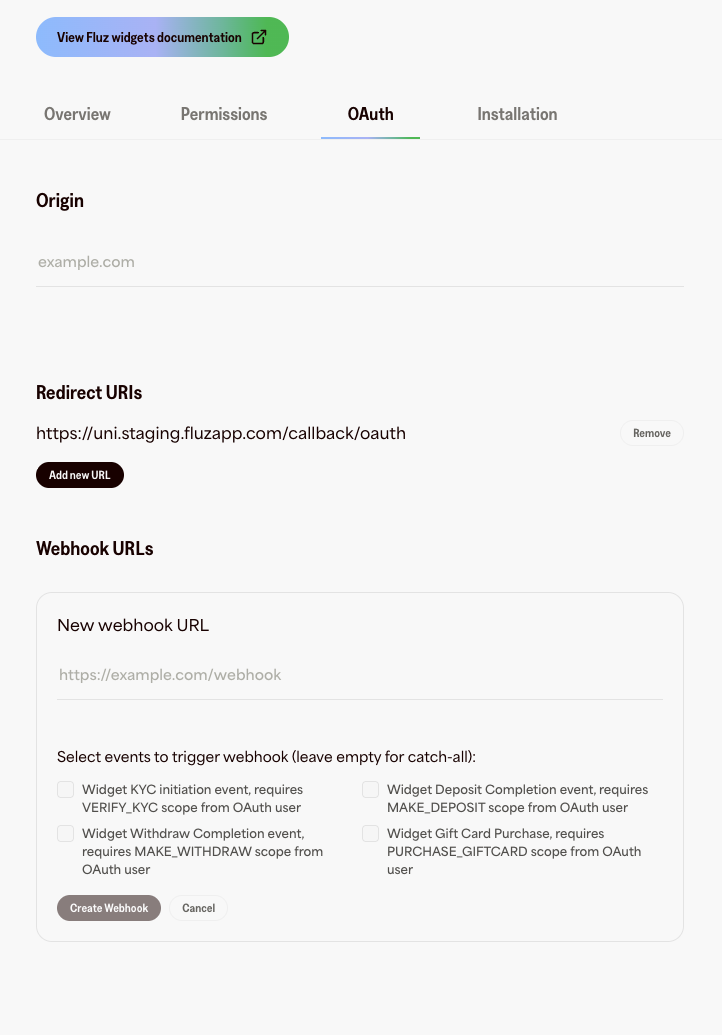
You can configure webhooks for your application through the developer portal:
- Navigate to For Developers → OAuth → Webhooks
- Click Add new URL
- Enter your HTTPS webhook endpoint URL
- Select which event types you want to receive (or leave empty for all events)
- Click Create Webhook
Requirements
When configuring your webhook:
- ✅ Must use HTTPS (HTTP endpoints will be rejected)
- ✅ Must be a publicly accessible URL
- ✅ Must respond to POST requests
- ✅ Must implement signature verification (see below)
- ✅ Should respond within 30 seconds
Managing Webhooks
- Add multiple webhooks - You can configure multiple webhook URLs for the same application
- Update events - Delete and recreate a webhook to change subscribed events
- Remove webhooks - Click the "Remove" button next to any webhook to delete it
Webhook Delivery
HTTP Request Format
POST /your/webhook/endpoint HTTP/1.1
Host: your-app.com
Content-Type: application/json
X-HMAC-Signature: <hmac_sha256_signature>
X-Event-ID: <event_correlation_id>
{
  "userId": "550e8400-e29b-41d4-a716-446655440000",
  "accountId": "550e8400-e29b-41d4-a716-446655440001",
  "externalReferenceId": "550e8400-e29b-41d4-a716-446655440002",
  "eventType": "WIDGET_DEPOSIT_COMPLETE",
  "amount": 50.00
}
Headers
| Header | Description |
|---|---|
Content-Type | Always application/json |
X-HMAC-Signature | HMAC SHA-256 signature of the request body for verification |
X-Event-ID | Unique identifier for this event (UUID format) |
Event Payloads
WIDGET_KYC_INITIATION
Sent when a KYC verification is initiated in the widget.
{
  "userId": "550e8400-e29b-41d4-a716-446655440000",
  "accountId": "550e8400-e29b-41d4-a716-446655440001",
  "externalReferenceId": "550e8400-e29b-41d4-a716-446655440002",
  "eventType": "WIDGET_KYC_INITIATION",
  "appId": "550e8400-e29b-41d4-a716-446655440003"
}
| Field | Type | Description |
|---|---|---|
userId | String (UUID) | The Fluz user ID |
accountId | String(UUID) | The Fluz account ID |
externalReferenceId | String | Your application's user identifier( from OAuth flow) |
appId | String (UUID) | Your application ID |
eventType | String | Always WIDGET_KYC_INITIATION |
WIDGET_DEPOSIT_COMPLETE
Sent when a user successfully deposits or sends money to the application.
{
  "userId": "550e8400-e29b-41d4-a716-446655440000",
  "accountId": "550e8400-e29b-41d4-a716-446655440001",
  "externalReferenceId": "550e8400-e29b-41d4-a716-446655440002",
  "appId": "550e8400-e29b-41d4-a716-446655440003",
  "eventType": "WIDGET_DEPOSIT_COMPLETE",
  "amount": 50.00
}
| Field | Type | Description |
|---|---|---|
userId | String (UUID) | The Fluz user ID |
accountId | String(UUID) | The Fluz account ID |
externalReferenceId | String | Your application's user identifier( from OAuth flow) |
appId | String (UUID) | Your application ID |
eventType | String | Always WIDGET_DEPOSIT_COMPLETE |
amount | Number | The deposit amount in USD(e.g., 50, 100.50) |
WIDGET_WITHDRAW_COMPLETE
Send when a user successfully withdraws or receives money from the application
{
  "userId": "550e8400-e29b-41d4-a716-446655440000",
  "accountId": "550e8400-e29b-41d4-a716-446655440001",
  "externalReferenceId": "550e8400-e29b-41d4-a716-446655440002",
  "appId": "550e8400-e29b-41d4-a716-446655440003",
  "eventType": "WIDGET_WITHDRAW_COMPLETE",
  "amount": 25.00
}
| Field | Type | Description |
|---|---|---|
userId | String (UUID) | The Fluz user ID |
accountId | String(UUID) | The Fluz account ID |
externalReferenceId | String | Your application's user identifier( from OAuth flow) |
appId | String (UUID) | Your application ID |
eventType | String | Always WIDGET_WITHDRAW_COMPLETE |
amount | Number | The deposit amount in USD(e.g., 25, 100.50) |
TRANSACTION_CREATE & TRANSACTION_UPDATE
Sends transaction initiated by user (TRANSACTION_CREATE - initiated with PENDING status, TRANSACTION_UPDATE - when there is an update like PENDING -> SETTLED status change )
{
  "recordId": "cec87136-38d5-4001-8eb9-310f330520a2",
  "user": "Amir Test",
  "accountId": "ff30139d-54ae-4483-8683-a07f6edbf13b",
  "amount": -58,
  "initialAmount": 58,
  "bonusCashbackRate": 0,
  "cardDisplayName": "",
  "cardLastFour": "0184",
  "cashBalanceAvailableBalance": 0,
  "cashBalanceDepositIds": null,
  "cashBalanceTotalBalance": 0,
  "cashback": 0.87,
  "cashbackRate": 1.5,
  "category": "Miscellaneous Specialty Retail",
  "challengeLogoUrl": null,
  "channel": null,
  "conversionRate": 1,
  "createdAt": "2026-05-06T16:55:16.176Z",
  "depositIds": null,
  "description": "Uber",
  "descriptorId": "2f30bea0-33a9-4b4b-95ce-b19662821d45",
  "destination": "Uber",
  "eventType": "TRANSACTION_CREATE",
  "externalFundingSourceActivity": -58,
  "fee": 0,
  "fluzBalanceActivity": 0.87,
  "giftCardPrepaymentBalanceAvailableBalance": 1002537.605,
  "giftCardPrepaymentBalanceTotalBalance": 1002537.605,
  "invitedAccountId": null,
  "isCashBalanceAffected": false,
  "isGiftCardBalanceAffected": false,
  "isReserveBalanceAffected": false,
  "isSeatBalanceAffected": true,
  "liabilityId": null,
  "logoUrl": "https://storage.googleapis.com/fluz-fluz-file-uploads-prod-ricuyxowbwlfprel/UBER-logo.jpg",
  "merchantId": "9f83fa82-435e-4553-9525-8c7871825f74",
  "merchantCategoryCode": 5999,
  "merchantCategoryDescription": "Miscellaneous Specialty Retail",
  "merchantCity": "No_city",
  "merchantCountry": "USA",
  "merchantIndustry": "Travel",
  "merchantName": "Uber",
  "note": null,
  "originalCurrencyAmount": 5800,
  "originalCurrencyCode": "USD",
  "otherCashBalanceAvailableBalance": 419594.8,
  "otherCashBalanceTotalBalance": 419594.8,
  "platformInstitutionLogo": null,
  "referenceId": "1047143",
  "reserveBalanceAvailableBalance": 0,
  "reserveBalanceTotalBalance": 0,
  "seatBalanceAvailableBalance": 1708.644,
  "seatBalanceTotalBalance": 1708.644,
  "source": "ACH Plaid Silver Standard 0.1% Interest Saving 1111 [$58.00]",
  "sourceType": null,
  "status": "PENDING",
  "transactionId": "cec87136-38d5-4001-8eb9-310f330520a2",
  "transactionType": "Virtual Card Purchase",
  "transferId": null,
  "usedUserCashBalanceId": null,
  "userId": "c6606c0e-f22f-4eee-85e5-17be6ae407bc",
  "virtualCardId": "7761e937-b9d7-4c71-b74e-2d9bbc9249ac",
  "virtualCardProgram": "HIGHNOTE_CFSB_MASTERCARD",
  "withdrawIds": null
}| Field | Type | Description |
|---|---|---|
recordId | UUID! | Transaction record ID |
user | String! | Fluz user full name |
accountId | UUID! | Fluz account ID |
userId | UUID | Fluz user ID |
transactionId | UUID! | Fluz transaction ID |
transactionType | String! | Transaction type (e.g., purchase, deposit, withdrawal) |
amount | Number! | Transaction amount in USD (e.g., 25, 100.50) |
initialAmount | Number | Initial transaction amount in USD (e.g., 25, 100.50) |
destination | String | Destination of funds |
source | String | Source of funds |
externalFundingSourceActivity | Number | Amount involving an external funding source |
fluzBalanceActivity | Number | Amount involving Fluz balance |
fee | Number | Fee charged on the transaction |
cashback | Number | Cashback earned on the transaction |
giftCardPrepaymentBalanceAvailableBalance | Number | Gift card prepayment available balance after transaction |
giftCardPrepaymentBalanceTotalBalance | Number | Gift card prepayment total balance after transaction |
cashBalanceAvailableBalance | Number | Available cash balance after transaction |
cashBalanceTotalBalance | Number | Total cash balance after transaction |
seatBalanceAvailableBalance | Number | Available seat (rewards) balance after transaction |
seatBalanceTotalBalance | Number | Total seat (rewards) balance after transaction |
reserveBalanceAvailableBalance | Number | Available reserve balance after transaction |
reserveBalanceTotalBalance | Number | Total reserve balance after transaction |
otherCashBalanceAvailableBalance | Number | Other cash available balance after transaction |
otherCashBalanceTotalBalance | Number | Other cash total balance after transaction |
status | AllTransactionsStatus! | Other cash total balance after transaction. Possible values: PENDING, SETTLED |
referenceId | UUID | External or cross-service reference ID |
description | String | Transaction description |
note | String | User-provided or system-generated note |
category | String | Transaction category |
cardLastFour | String | Last four digits of a card used |
cardDisplayName | String | Display name of the card used |
originalCurrencyAmount | Number | Transaction amount in the original (foreign) currency |
originalCurrencyCode | String | ISO currency code of the original currency |
conversionRate | Number | Exchange rate applied for currency conversion |
merchantId | UUID | Internal merchant ID |
merchantName | String | Merchant name |
merchantCountry | String | Merchant country |
merchantState | String | Merchant state/region |
merchantCity | String | Merchant city |
merchantIndustry | String | Merchant industry classification |
merchantCategoryCode | Number | Merchant Category Code (MCC) |
merchantCategoryDescription | String | MCC description |
merchantCategoryLogoUrl | String | URL of the merchant category logo |
merchantCategoryImageUrl | String | URL of the merchant category image |
descriptorId | String | Descriptor ID (enriched merchant data) |
virtualCardId | String | ID of the virtual card used |
virtualCardProgram | String | Virtual card program/provider name |
cashbackRate | Number | Cashback rate applied to the transaction |
bonusCashbackRate | Number | Bonus cashback rate (e.g., promo or challenge-based) Channel & Display |
channel | String | Channel through which the transaction originated |
sourceType | String | Type of the funding source used |
logoUrl | String | Logo URL for the transaction display |
platformInstitutionLogo | String | Logo of the platform/institution involved |
challengeLogoUrl | String | Logo URL for an associated challenge |
invitedAccountId | UUID | Account ID of an invited user (for referral-related transactions) |
expectedClearedDate | String | Expected date when the transaction clears |
liabilityId | UUID | Associated liability record identifier |
isGiftCardBalanceAffected | Boolean | Whether the gift card prepayment balance was affected |
isCashBalanceAffected | Boolean | Whether the cash balance was affected |
isSeatBalanceAffected | Boolean | Whether the seat (rewards) balance was affected |
isReserveBalanceAffected | Boolean | Whether the reserve balance was affected |
isRefundedBySystem | Boolean | Whether the transaction was automatically refunded by the system |
cashBalanceDepositIds | [UUID] | Related cash balance deposits IDs |
depositIds | [UUID] | Related deposits IDs |
withdrawIds | [UUID] | Related withdrawals IDs |
transferId | UUID | Related transfer ID |
connectedAppId | UUID! | Connected OAuth application ID |
connectedAppName | String! | Connected OAuth application display name |
usedUserCashBalanceId | UUID! | ID of user cash balance used |
spendAccountNickname | String | Nickname of the spend account used |
isPrivate | Boolean | Whether the transaction is private (hidden from social feed) |
createdAt | Date! | Timestamp when the record was created |
updatedAt | Date | Timestamp when the record was last updated |
TRANSACTION_DECLINE
Sends declined transaction payload (when transaction was declined for whatever reason)
{
  "transactionId": "a1b2c3d4-e5f6-7890-abcd-ef1234567890",
  "transactionType": "PURCHASE",
  "amount": 25.99,
  "fluzAmount": 0,
  "externalFundingAmount": 25.99,
  "currency": "USD",
  "sourceRecordType": "VirtualCardTransaction",
  "sourceRecordId": "d4e5f6a7-b890-1234-cdef-567890abcdef",
  "accountId": "b2c3d4e5-f6a7-8901-bcde-f12345678901",
  "userId": "c3d4e5f6-a7b8-9012-cdef-123456789012",
  "source": "CARD",
  "destination": "Merchant Name",
  "status": "DECLINED",
  "merchantId": "e5f6a7b8-9012-3456-def0-1234567890ab",
  "descriptorId": "f6a7b890-1234-5678-ef01-234567890abc",
  "liabilityId": "a7b89012-3456-7890-f012-34567890abcd",
  "vendorName": "Highnote",
  "merchantName": "Amazon.com",
  "merchantCountry": "US",
  "merchantCity": "Seattle",
  "merchantState": "WA",
  "logoUrl": "https://cdn.fluz.app/merchants/amazon-logo.png",
  "category": "Shopping",
  "cardLastFour": "4321",
  "cardDisplayName": "My Virtual Card",
  "virtualCardId": "b8901234-5678-90ab-0123-4567890abcde",
  "virtualCardProgram": "HIGHNOTE",
  "channel": "MOBILE_APP",
  "externalFundingSourceType": "BANK_CARD",
  "externalFundingSourceId": "c9012345-6789-0abc-1234-567890abcdef",
  "fundingSourceSubtype": "DEBIT",
  "isCashBalanceUsed": false,
  "isPrepaymentBalanceUsed": false,
  "isRewardsBalanceUsed": false,
  "isReserveBalanceUsed": false,
  "transactionDateTime": "2025-03-19T12:00:00.000Z",
  "spendAccountNickname": "Daily Spending",
  "declineTitle": "Transaction Declined",
  "declineReason": "Insufficient spend limit",
  "declineDescription": "Your virtual card spend limit has been exceeded for this period.",
  "declineCtaText": "Review Spend Limits",
  "declineCategory": "SPEND_LIMIT",
  "offerId": "d0123456-7890-abcd-2345-67890abcdef0",
  "issuer": "Highnote",
  "bin": "423456",
  "limitAmount": "500.00",
  "limitDuration": "MONTHLY",
  "lockOnNextUse": "false",
  "lockDate": null,
  "bankAccountNickname": "Chase Checking",
  "bankAccountLastFour": "7890",
  "isPrivate": true
}| Field | Type | Description |
|---|---|---|
transactionId | UUID! | Fluz transaction ID |
transactionType | String! | Type of transaction that was declined (e.g., PURCHASE) |
amount | Number! | Total transaction amount that was attempted |
fluzAmount | Number! | Portion of the amount sourced from Fluz balance |
externalFundingAmount | Number! | Portion of the amount sourced from an external funding source |
currency | String! | ISO currency code (e.g., USD) |
sourceRecordType | String | Type of the originating record (e.g., VirtualCardTransaction) |
sourceRecordId | UUID | Originating record ID |
source | String | Source of the attempted funds (e.g., CARD) |
destination | String | Intended destination of the funds (e.g., merchant name) |
status | DeclinedTransactionStatus! | Decline status (enum, e.g., DECLINED) |
merchantId | UUID | Internal merchant identifier |
descriptorId | UUID | Descriptor record ID (enriched merchant data) |
liabilityId | UUID | Associated liability record ID |
vendorName | String | Name of the card-issuing vendor (e.g., Highnote) |
merchantName | String | Merchant name (may be null if unknown) |
merchantCountry | String | Merchant country |
merchantState | String | Merchant state/region |
merchantCity | String | Merchant city |
logoUrl | String | Logo URL for the transaction display |
category | String | Transaction category label |
cardLastFour | String | Last four digits of the card used |
cardDisplayName | String | Display name of the card used |
virtualCardId | UUID | ID of the virtual card involved |
virtualCardProgram | String | Virtual card program/provider name (e.g., HIGHNOTE) |
channel | String | Channel through which the transaction originated (e.g., MOBILE_APP) |
externalFundingSourceType | String | Type of external funding source (e.g., BANK_CARD) |
externalFundingSourceId | String | Identifier of the external funding source |
fundingSourceSubtype | String | Subtype of the funding source (e.g., DEBIT, CREDIT) |
isCashBalanceUsed | Boolean! | Whether the cash balance was involved in the attempt |
isPrepaymentBalanceUsed | Boolean! | Whether the gift card prepayment balance was involved |
isRewardsBalanceUsed | Boolean! | Whether the rewards (seat) balance was involved |
isReserveBalanceUsed | Boolean! | Whether the reserve balance was involved |
transactionDateTime | String! | ISO 8601 timestamp of the transaction attempt |
spendAccountNickname | String | Nickname of the spend account used |
declineTitle | String | Short title for the decline (e.g., "Transaction Declined") |
declineReason | String | Machine/human-readable decline reason |
declineDescription | String | Longer explanation of the decline cause |
declineCtaText | String | Call-to-action text shown to the user (e.g., "Review Spend Limits") |
declineCategory | String | Category of the decline (e.g., SPEND_LIMIT, FRAUD) |
offerId | UUID | Associated offer ID |
issuer | String | Card issuer name |
bin | String | Bank Identification Number (first 6 digits of the card) |
limitAmount | String | Spend limit amount |
limitDuration | String | Duration window of the spend limit (e.g., MONTHLY) |
lockOnNextUse | String | Whether the card is set to lock on next use |
lockDate | String | Date the card was/will be locked |
bankAccountNickname | String | Nickname of the linked bank account |
bankAccountLastFour | String | Last four digits of the linked bank account |
isPrivate | Boolean | Whether the transaction is private (hidden from social feed) |
Verifying Webhook Signatures
Every webhook request includes an HMAC signature that you must verify to ensure the request came from Fluz.
Verification Steps
- Extract the signature from the
X-HMAC-Signatureheader - Compute the HMAC SHA-256 of the raw request body using your application's API key as the secret
- Compare your computed signature with the received signature
Example Verification (Node.js)
const crypto = require('crypto');

function verifyWebhookSignature(payload, signature, apiKey) {
  const computedSignature = crypto
    .createHmac('sha256', apiKey)
    .update(JSON.stringify(payload))
    .digest('hex');

  return crypto.timingSafeEqual(
    Buffer.from(signature),
    Buffer.from(computedSignature)
  );
}

// Express.js example
app.post('/webhook', express.json(), (req, res) => {
  const signature = req.headers['x-hmac-signature'];
  const eventId = req.headers['x-event-id'];

  if (!verifyWebhookSignature(req.body, signature, YOUR_API_KEY)) {
    return res.status(401).send('Invalid signature');
  }

  // Process the webhook
  const { eventType, userId, amount } = req.body;

  console.log(`Received ${eventType} for user $USERID`);

  // Always respond with 200 to acknowledge receipt
  res.status(200).send('OK');
});
Example Verification (Python)
import hmac
import hashlib
import json

def verify_webhook_signature(payload: dict, signature: str, api_key: str) -> bool:
    payload_string = json.dumps(payload, separators=(',', ':'))
    computed_signature = hmac.new(
        api_key.encode('utf-8'),
        payload_string.encode('utf-8'),
        hashlib.sha256
    ).hexdigest()

    return hmac.compare_digest(signature, computed_signature)

# Flask example
@app.route('/webhook', methods=['POST'])
def webhook():
    signature = request.headers.get('X-HMAC-Signature')
    event_id = request.headers.get('X-Event-ID')
    payload = request.json

    if not verify_webhook_signature(payload, signature, YOUR_API_KEY):
        return 'Invalid signature', 401

    # Process the webhook
    event_type = payload['eventType']
    user_id = payload['userId']

    print(f"Received {event_type} for user USER_ID")

    # Always respond with 200
    return 'OK', 200
Responding to webhooks
Your endpoint must:
- ✅ Respond with HTTP status 200-299 within 30 seconds
- ✅ Return quickly (process events asynchronously if needed)
- ✅ Be publicly accessible via HTTPS
- ❌ Do NOT respond with redirects (3xx)
- ❌ Do NOT respond with client errors (4xx) or server errors (5xx) for valid webhooks
Example Response Handler
app.post('/webhook', express.json(), async (req, res) => {
  const signature = req.headers['x-hmac-signature'];

  // 1. Verify signature
  if (!verifyWebhookSignature(req.body, signature, YOUR_API_KEY)) {
    return res.status(401).send('Invalid signature');
  }

  // 2. Respond immediately
  res.status(200).send('OK');

  // 3. Process asynchronously
  processWebhookAsync(req.body).catch(err => {
    console.error('Error processing webhook:', err);
  });
});

async function processWebhookAsync(payload) {
  const { eventType, userId, accountId, amount } = payload;

  switch (eventType) {
    case 'WIDGET_DEPOSIT_COMPLETE':
      await updateUserBalance(userId, amount);
      break;
    case 'WIDGET_WITHDRAW_COMPLETE':
      await recordWithdrawal(userId, amount);
      break;
    // ... handle other events
  }
}
Retry Behavior
If your endpoint fails to response with a 2xx status code, Fluz will automatically retry the webhook delivery:
- Maximum attempts: 5
- Retry schedule: Exponential backoff managed by Google Cloud Tasks
- Timeout: 30 seconds per attempt
After 5 failed attempts, the webhook event is marked as FAILEDand delivery stops. Monitor your webhook endpoint logs to ensure you're receiving and processing events successfully.
Best Practices
Security
- ✅ Always verify HMAC signatures before processing webhook data
- ✅ Use HTTPS endpoints only
- ✅ Keep your API key secret and rotate periodically
- ❌ Do not expose your webhook endpoint to the public without authentication
Reliability
- ✅ Respond with 200 immediately, then process asynchronously
- ✅ Implement idempotency using the X-Event-ID header (events may be retried)
- ✅ Store processed event IDs to prevent duplicate processing
- ✅ Monitor webhook failures and set up alerting
Performance
- ✅ Keep your endpoint fast (respond within 5 seconds ideally)
- ✅ Use a queue for heavy processing
- ✅ Scale your webhook endpoint to handle bursts
Idempotency
Webhooks may be delivered more than once. Use the X-Event-ID header to detect and handle duplicate deliveries:
const processedEvents = new Set(); // Use Redis/DB in production

app.post('/webhook', async (req, res) => {
  const eventId = req.headers['x-event-id'];

  // Check if already processed
  if (processedEvents.has(eventId)) {
    console.log(`Event ${eventId} already processed, skipping`);
    return res.status(200).send('OK');
  }

  // Verify signature
  if (!verifyWebhookSignature(req.body, req.headers['x-hmac-signature'], API_KEY)) {
    return res.status(401).send('Invalid signature');
  }

  // Respond immediately
  res.status(200).send('OK');

  // Mark as processed
  processedEvents.add(eventId);

  // Process event
  await processWebhookAsync(req.body);
});
FAQ
How do I know which user triggered the event?
Use the externalReferenceId field, which contains the user identifier you provided during the OAuth authorization flow. This maps to your application's user ID.
Can I receive webhooks for multiple applications?
Yes, configure separate webhook endpoints for each application, or use a single endpoint and differentiate by the appId field included in all webhook payloads.
What if my endpoint is temporarily down?
Fluz will retry the webhook up to 5 times with exponential backoff. After 5 failures, the event is marked as failed. Contact support if you need events re-sent.
Are webhooks sent in order?
Webhooks are sent as events occur, but delivery order is not guaranteed. Use timestamps and event IDs to order events if needed.
Need Help?
- Setup assistance: Contact [email protected]
- Technical issues: Check your webhook logs and contact support with the X-Event-ID
- Scope questions: See the OAuth Scopes documentation
Updated 3 days ago