
Send Hosted Links With Virtual Cards
Create and manage shareable links to distribute virtual cards on your account.
Generate Share Links
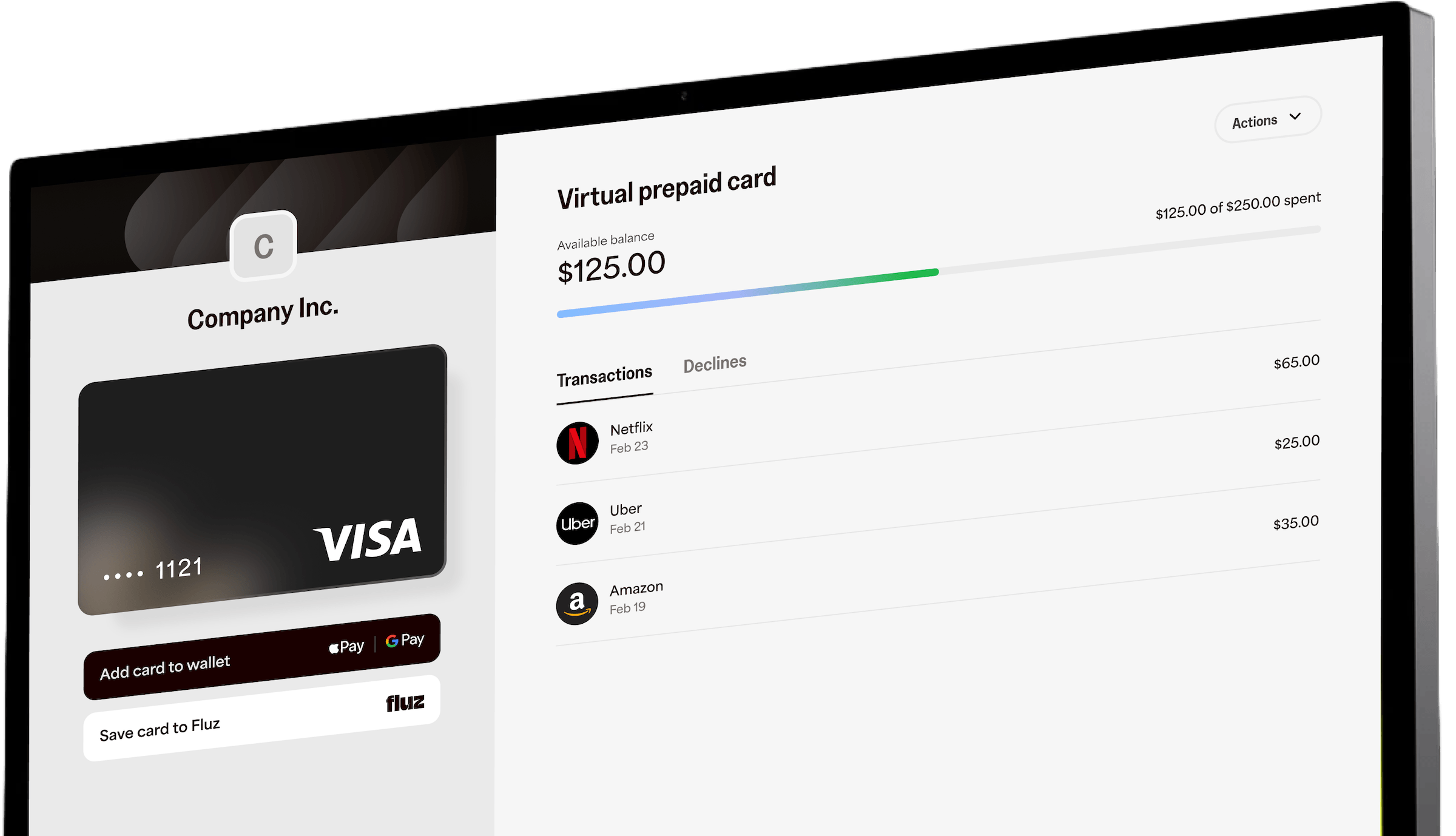
Generate hosted virtual card links ("open-loop" Send Cards) from your platform. You call one API to mint one or more links, then deliver those links to recipients however you like — by email, by SMS, or by handing back the raw URLs to embed in your own flows. When a recipient opens the link, they land on a Fluz-hosted page, verify themselves, and claim a single-load virtual card funded from your account.
What "hosted" / "open-loop" meansA hosted link points to a Fluz-hosted activation page. Open-loop means the resulting virtual card is a network card (Visa/Mastercard-style) that can be spent at many merchants, subject to your program's rules — not a single-brand closed-loop gift card.
Pre-requisitesBefore using this mutation, review Share Virtual Cards for feature access requirements. Your application must be granted the
CREATE_SHARE_LINKscope, and your account must be enabled for sending virtual cards. Contact your sales rep to get access. Reference: Application Scopes.
How it works
- You generate links. Each link represents one card with its own limit, funded from the spend account you specify. Cards are configured with a card limit, an offer, and an optional expiration window.
- The link is delivered. Fluz sends it via SMS or email on your behalf, or returns the raw URL for you to deliver through your own system (
GENERATE_URL). - The recipient activates. The recipient opens the link, verifies their phone number with a one-time code, and sets a card PIN. No app download and no password — activation is anchored to the recipient's phone number, and every future card sent to that number activates the same way.
- The card is funded at claim time. The card limit is drawn against your spend account when the recipient claims the card — not when the link is generated. The recipient can then view card details, spend online, and add the card to Apple Pay or Google Pay in one tap.
The recipient becomes an authorized user of that virtual card object only — they do not gain access to your account, balances, or any other cards.
See the recipient experience in action: desktop flow · mobile flow.

Availability & scope
| Capability | Status |
|---|---|
| Single-load virtual cards | ✅ Supported |
| Single-use / reloadable cards | ❌ Not supported |
| Generate links via API | ✅ Supported |
| Generate links via CSV Import | ✅ Supported |
| Hosted gift-card links | ❌ Not in scope (virtual cards only) |
The card share-link object type is VIRTUAL_CARD and the card type is SINGLE_LOAD.
Gift cards: Despite the "virtual cards and gift cards" framing of the broader initiative, there is no hosted gift-card claim flow today. Gift-card balances appear in this area only as a potential funding source for hosted virtual cards (planned, not yet enabled). Document and build against virtual cards only.
How it works
- You generate links. Call
generateVCShareLinkswith the offer, card limit, quantity, funding source, and a delivery method. - Fluz creates a share request per link. Each link maps to one share request (
PENDING) and one hosted URL. - Delivery happens. With
GENERATE_URLyou get the URLs back to distribute yourself. WithEMAILorPHONE_NUMBER, Fluz delivers a link to each recipient for you. - The recipient claims the card. They open the hosted page, authenticate, and a single-load virtual card is issued to them, funded from your account.
Authentication
All Send Cards operations are on the Fluz GraphQL API.
- Endpoint:
POST https://<your-fluz-api-host>/api/v1/graphql - Header:
Authorization: Bearer <access_token> - Required scope:
CREATE_SHARE_LINK
You must use a Bearer access token (an OAuth/developer-application access token). Basic auth is rejected for these operations. The token must carry the CREATE_SHARE_LINK scope, or the request is rejected before it runs.
// When minting the sender's access token, request the scope:
{
  "scopes": ["CREATE_SHARE_LINK"]
}
Account accessYour account must also have Send Cards enabled (the
send_virtual_cards_enabledcampaign flag). Without it, every operation returns a permissions error: "Missing permissions! Please contact your sales rep to get access to generate VC share links." If you see this, contact your Fluz representative.
Operation reference
There are three public operations, all gated by the CREATE_SHARE_LINK scope:
| Operation | Type | Purpose |
|---|---|---|
generateVCShareLinks | Mutation | Create one or more hosted virtual card links |
getVCShareLinks | Query | List/inspect previously generated links |
deactivateVCShareLinks | Mutation | Deactivate (expire) links you generated |
generateVCShareLinks
generateVCShareLinksCreates quantity share requests and returns one hosted link per request.
mutation GenerateVCShareLinks($input: GenerateVCShareLinksInput!) {
  generateVCShareLinks(input: $input) {
    shareLinks
  }
}
Input fields
| Field | Type | Required | Description |
|---|---|---|---|
cardLimit | Int! | Yes | Spend limit (and load amount) for each card, in whole currency units. Must be a whole number ≥ the program minimum. |
offerId | String! | Yes | UUID v4 of the merchant offer the card is tied to. The offer must be active and its merchant must be shareable. |
quantity | Int! | Yes | Number of links to generate. One distinct hosted URL is created per unit. |
shareMethod | ShareMethodType! | Yes | How links are delivered: GENERATE_URL, EMAIL, or PHONE_NUMBER. |
userCashBalanceId | UUID | Yes* | The spend account used to fund the cards. Marked optional in the schema but required in practice — omitting it fails validation. |
daysUntilExpiration | Int | No | Days until the link expires. Minimum 1. Defaults to the program default (30 days) if omitted. This date also becomes the card's lock/freeze date — see Expiration & freeze. |
recipientListEmail | [String] | Conditional | Required and non-empty when shareMethod = EMAIL. Length must equal quantity. Must be empty otherwise. |
recipientListPhone | [String] | Conditional | Required and non-empty when shareMethod = PHONE_NUMBER. Length must equal quantity. Must be empty otherwise. |
Funding sourceToday, the only supported funding source is a spend account (
userCashBalanceId), and it must belong to your (the sender's) account. Cards are funded from the sender's account. Additional funding sources (bank account, bank card, prepayment/rewards balance) are not yet available.
Delivery methods (shareMethod)
shareMethod)| Value | Behavior | Recipient list |
|---|---|---|
GENERATE_URL | Fluz returns the hosted URLs in the response. You distribute them yourself. | Both lists must be empty/omitted. |
EMAIL | Fluz emails a link to each recipient. | recipientListEmail required; length must equal quantity. |
PHONE_NUMBER | Fluz texts a link to each recipient. | recipientListPhone required; length must equal quantity. |
Validation rules
cardLimitmust be a whole number and at least the program minimum.offerIdmust be a valid UUID v4 for an active offer whose merchant is shareable.quantitymust be a whole number.- When delivering by
EMAILorPHONE_NUMBER, the matching recipient list length must equalquantity. Mismatches return a clear error and create no records. - Only one funding source may be supplied.
userCashBalanceIdmust be a valid UUID v4 owned by the sender's account. - Invalid card types or malformed inputs return clear errors and create no records.
Examples
Generate 3 raw URLs (no recipients):
mutation GenerateVCShareLinks($input: GenerateVCShareLinksInput!) {
  generateVCShareLinks(input: $input) {
    shareLinks
  }
}{
"input": {
"cardLimit": 25,
"offerId": "11111111-2222-3333-4444-555555555555",
"daysUntilExpiration": 30,
"quantity": 3,
"shareMethod": "GENERATE_URL",
"userCashBalanceId": "aaaaaaaa-bbbb-cccc-dddd-eeeeeeeeeeee"
}
}Email a link to each of two recipients:
{
  "input": {
    "cardLimit": 25,
    "offerId": "11111111-2222-3333-4444-555555555555",
    "daysUntilExpiration": 30,
    "quantity": 2,
    "shareMethod": "EMAIL",
    "recipientListEmail": ["[email protected]", "[email protected]"],
    "userCashBalanceId": "aaaaaaaa-bbbb-cccc-dddd-eeeeeeeeeeee"
  }
}
Text a link to each of two recipients:
{
  "input": {
    "cardLimit": 25,
    "offerId": "11111111-2222-3333-4444-555555555555",
    "daysUntilExpiration": 30,
    "quantity": 2,
    "shareMethod": "PHONE_NUMBER",
    "recipientListPhone": ["+12125550101", "+12125550102"],
    "userCashBalanceId": "aaaaaaaa-bbbb-cccc-dddd-eeeeeeeeeeee"
  }
}
Response
{
  "data": {
    "generateVCShareLinks": {
      "shareLinks": [
        "https://fluz.app/virtual-prepaid-card/3f8a...c1",
        "https://fluz.app/virtual-prepaid-card/9b2d...77",
        "https://fluz.app/virtual-prepaid-card/0c41...e3"
      ]
    }
  }
}
shareLinks is an array of hosted URLs, one per quantity. Each URL has the form:
https://fluz.app/virtual-prepaid-card/{share_request_id}
Tracking what you generatedThe response returns only the URLs. To retrieve the batch ID and display IDs for the links you just created (needed for listing and deactivation), use
getVCShareLinksfiltered by status.
getVCShareLinks
getVCShareLinksLists previously generated share links so you can inspect status, recipients, expiration, and the issued card.
query GetVCShareLinks($input: GetVCShareLinksInput!) {
  getVCShareLinks(input: $input) {
    senderAppId
    shareRequestBatchId
    shareRequestDisplayId
    shareObjectStatus
    recipientPhone
    recipientEmail
    linkExpirationDate
    virtualCardId
    linkUrl
    shareRequestDetails {
      cardLimit
      offerId
      daysUntilExpiration
      quantity
      shareMethod
      recipientListEmail
      recipientListPhone
      userCashBalanceId
    }
  }
}
Input fields
| Field | Type | Description |
|---|---|---|
shareObjectStatuses | [ShareObjectStatus] | Filter by status: PENDING, ISSUED, USED, EXPIRED. |
shareRequestBatchIds | [String] | Return only links in these batches. |
shareRequestDisplayIds | [String] | Return only the links with these display IDs. |
Recommended flowOn the first call, filter by
shareObjectStatusesonly. The response gives youshareRequestBatchIdandshareRequestDisplayIdvalues; use those to filter precisely on subsequent calls (and to deactivate).
Response fields (GeneratedShareLink)
GeneratedShareLink)| Field | Type | Description |
|---|---|---|
senderAppId | String | The app/developer application that generated the link. |
shareRequestBatchId | String | Batch identifier shared by all links generated in one call. |
shareRequestDisplayId | String | Human-friendly per-link identifier. |
shareObjectStatus | ShareObjectStatus | PENDING, ISSUED, USED, or EXPIRED. |
recipientEmail | String | Recipient email, if delivered by email. |
recipientPhone | String | Recipient phone, if delivered by SMS. |
linkExpirationDate | DateTime | When the link expires / card freezes. |
virtualCardId | String | The issued virtual card ID, once claimed. |
linkUrl | String | The hosted URL for the link. |
shareRequestDetails | ShareRequestDetails | The original configuration (card limit, offer, quantity, delivery, funding). |
Examples
{ "input": { "shareObjectStatuses": ["PENDING", "ISSUED"] } }{ "input": { "shareRequestBatchIds": ["ABC123", "XYZ789"] } }{ "input": { "shareRequestDisplayIds": ["SR-000001", "SR-000002"] } }deactivateVCShareLinks
deactivateVCShareLinksDeactivates (expires) links you generated — for example, if a batch was sent in error or you need to revoke unclaimed links. Deactivating a link sets it to EXPIRED; an unclaimed link can no longer be claimed.
mutation DeactivateVCShareLinks($input: DeactivateVCShareLinksInput!) {
  deactivateVCShareLinks(input: $input)
}
Input fields
| Field | Type | Description |
|---|---|---|
shareRequestBatchIds | [String] | Deactivate every link in these batches. |
shareRequestDisplayIds | [String] | Deactivate only the links with these display IDs. |
Get the batch IDs from getVCShareLinks.
Example
{ "input": { "shareRequestBatchIds": ["ABC123"] } }Response
Returns a human-readable confirmation string, e.g. "3 share requests successfully deactivated!".
If a recipient has already claimed a link (statusISSUED/USED), deactivating the link does not claw back the issued card. To stop spend on an already-issued card, use the relevant card lifecycle/freeze controls.
The recipient experience
When a recipient opens a hosted link (https://fluz.app/virtual-prepaid-card/{share_request_id}):
Screenshot placeholder — hosted "Activate your card" landing page (from fluz.app/us/open-loop).
- Landing & sign-in. The recipient sees the activation page branded with the sender's business. They sign in through the Fluz auth portal (new recipients onboard here).
- Two-factor authentication. On initial load, existing users are taken to the 2FA screen. 2FA is required before the card can be viewed or claimed.
- Billing address (if needed). If the recipient has no billing address on file, they're prompted to add one. Billing address is required for online purchases.
- PIN (if not yet issued). Before the card is issued, the recipient sets a PIN.
- Card issued & claimed. A single-load virtual card is created and assigned to the recipient, funded from the sender's account, with a lock date equal to the link's expiration date.
- Use the card. Once claimed, the recipient can see card details, transactions, and (where supported) add the card to a mobile wallet.
Screenshot placeholder — claimed virtual card details view (from fluz.app/us/open-loop).
Already claimed?If the same user opens a link they already claimed, they see their card details. If a different user opens a link that someone else already claimed, they're shown an access-denied state after 2FA.
Expiration & freeze
The link's expiration date does double duty:
- Link expiration — after this date, an unclaimed link can no longer be claimed.
- Card freeze / lock date — for an issued card, this is the lock date (end of that day). After it, the card is frozen and cannot be spent.
- Card expiry is aligned to the end of the month of the freeze date (e.g., a freeze date of 6/15/2026 yields a card expiry of 6/30/2026).
Set the window with daysUntilExpiration at generation time. If omitted, the program default (30 days) is used. This date is shown to the recipient (typically as a "Valid until" date).
Program rules to communicate to recipients
These are program-level rules for hosted (open-loop) virtual cards. Confirm the exact values for your program with your Fluz representative — several are partner-negotiated.
| Rule | Default | Notes |
|---|---|---|
| Daily account spend limit | $250,000/day | Some partners have a custom limit. |
| Restaurant transaction buffer | 25% | A 25% buffer applies to all programs (to accommodate tips/holds at restaurants). |
| Restricted merchants / categories | Program-specific | Certain merchant categories are restricted. |
| Funding | Sender's spend account | Cards are funded from the sender's account at claim time. |
Customer support for recipients: 1-888-360-6660 · [email protected]
The full partner-facing reference (terminology, recipient walkthrough with screenshots, funding instructions, restricted categories, and support) lives in the Partner Guide — Hosted URL Virtual Cards. Ask your Fluz contact for the latest copy for your program.
Status & error reference
Share object statuses
| Status | Meaning |
|---|---|
PENDING | Link generated, not yet claimed. |
ISSUED | Recipient claimed the link; a virtual card was issued. |
USED | The issued card has been used. |
EXPIRED | Link expired or was deactivated; no longer claimable. |
Recipient-facing link errors
| Condition | What the recipient sees |
|---|---|
| Link expired before being claimed | "Expired before issued" — link can no longer be claimed. |
| Sender deactivated the link early | "Frozen by sender" — link was revoked before expiry. |
| Card was claimed, then its lock date passed | "Expired after issued" — card is frozen. |
| A different user opens an already-claimed link | "Access denied". |
Common API errors
| Cause | Result |
|---|---|
Missing/invalid Bearer token or missing CREATE_SHARE_LINK scope | Request rejected (unauthorized). |
Account lacks Send Cards access (send_virtual_cards_enabled) | Permissions error directing you to your sales rep. |
Recipient list length ≠ quantity | Clear validation error; no records created. |
Inactive offer, non-shareable merchant, or invalid offerId | Validation error; no records created. |
Missing/invalid userCashBalanceId, or more than one funding source | Validation error; no records created. |
Notes & limitations
- Returned URL is the hosted destination, not a short link. Internally, links are also wrapped by a short-link provider, but the API returns the canonical hosted URL (
/virtual-prepaid-card/{share_request_id}). Distribute the URL exactly as returned. userCashBalanceIdis effectively required even though the schema marks it optional.- Hidden/internal fields are not part of this API. Object type and card type are fixed (
VIRTUAL_CARD/SINGLE_LOAD) and other funding-source fields are not yet enabled; do not send them. - Gift-card hosted links are not supported. This API is for virtual cards only.